
Bitcoin Correlation With Stocks: S&P 500 & Nasdaq Data


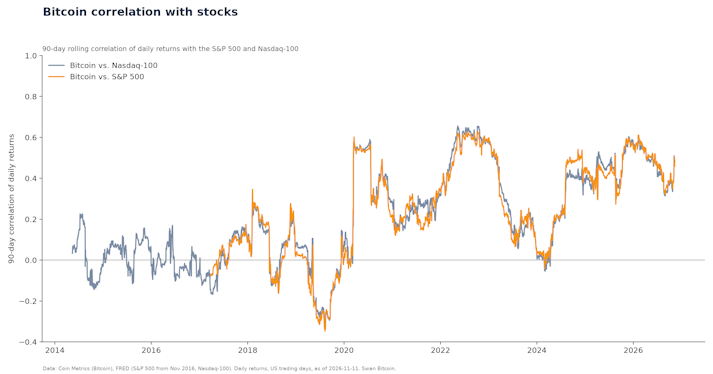
Bitcoin’s correlation with the S&P 500 was 0.42 in 2025 and 0.46 over the last 90 days (Nov 2026). Yearly data since 2017, Nasdaq, dollar and crash days.
In this article
The best Bitcoin wallet for most people in 2026 is a Bitcoin-only hardware wallet paired with an open-source app: Blockstream Jade Plus ($149) for most savers, the Trezor Safe 3 ($59, Bitcoin-only edition available) for the lowest-cost start, and the Coldcard Q ($319) for advanced users. For spending money on your phone, use BlueWallet or the Blockstream app. For savings that would hurt to lose, use a 2-of-3 multisig wallet so no single lost device, bug or stolen seed phrase can take your Bitcoin.
Prices, platforms and features below were checked on each maker’s own website on November 13, 2026. Here is the short list, then the details.
Best overall hardware wallet: Blockstream Jade Plus. $149 (plastic) or $169 (metal); Jade Core $99. Bitcoin-only, fully open-source hardware and firmware, air-gapped signing with a camera and QR codes. Works with the Blockstream app on iOS, Android and desktop.
Best budget hardware wallet: Trezor Safe 3. $59. Open source, with a Bitcoin-only firmware option. The Trezor Safe 5 ($129) adds a color touchscreen.
Best for advanced users: Coldcard Q. $319; Coldcard Mk5 $219. Bitcoin-only, open and reproducible firmware, air-gapped signing by QR code, microSD or NFC, no Bluetooth. Read the July 2026 seed advisory below before you buy or use one.
Best mobile wallet: BlueWallet. Free, open source, iOS and Android, connects to hardware wallets and supports multisig vaults.
Best desktop wallet: Sparrow. Free, version 2.5.6 for macOS, Windows and Linux, with single-sig and multisig wallets and support for common hardware wallets over USB or air-gapped.
Best for Lightning payments: Phoenix or Muun. Both are self-custodial and on iOS and Android.
Best for large savings and inheritance: a 2-of-3 multisig vault. Collaborative options: Swan Vault, Unchained and Casa. Do-it-yourself options: Nunchuk or Sparrow with hardware wallets from two or three different makers.
We scored wallets on what protects your Bitcoin, in this order:
Bitcoin focus. Bitcoin-only firmware has less code to attack and fewer features to get wrong.
Open source. Anyone can inspect the code, so security claims can be checked.
Self-custody. You hold the keys; the company cannot freeze or lose your coins.
Air-gapped or offline signing for hardware wallets.
Multisig and hardware wallet support for software wallets.
Track record, including how the maker handled security problems.
Price and ease of use.
We checked prices, platforms and features on each company’s own website on November 13, 2026. We did not run lab tests on the devices. Prices change often, so confirm them before buying.
Disclosure: Swan sells Bitcoin and offers Swan Vault, a multisig service built on Blockstream Jade Plus devices. We list Swan Vault in the multisig category with its full fees, next to competing services.
A Bitcoin wallet is software or a device that stores your private keys, the secret numbers that let you spend your Bitcoin. The coins themselves stay on the Bitcoin network; the wallet holds the keys and creates addresses for receiving.
Your public address is safe to share: it’s how people pay you. Your private key, or the seed phrase that backs it up, must stay secret. Anyone who has it can move your Bitcoin.
Bitcoin is a bearer asset. When you hold your own keys, no bank, exchange or custodian stands between you and your money. That is the main reason to use your own wallet, and the main responsibility that comes with it.
A hardware wallet, also called a signing device, keeps your private keys on a small offline device. It signs transactions without exposing the keys to your phone or computer, which makes it the right choice for long-term savings.
Blockstream Jade Plus: $149 to $169.
Bitcoin-only. Blockstream says the hardware and firmware are fully open source.
Signs fully air-gapped with its camera and QR codes, or over USB-C or Bluetooth.
Uses a “Blind Oracle” PIN design instead of a closed secure-element chip, and supports multisig.
Pairs with the Blockstream app on iOS, Android and desktop. Jade Core is the $99 version.
It’s the device Swan Vault uses. Read why we chose Blockstream Jade for Swan Vault.
Coldcard Q and Mk5: $319 and $219.
Bitcoin-only, made by Coinkite, with firmware Coinkite describes as open, verifiable and reproducible.
Signs air-gapped by QR code (Q), microSD or NFC. No Bluetooth.
Built for advanced users: on-device multisig setup, dice-roll entropy and BIP-39 passphrases. No companion app or account is required.
The Mk4 is no longer sold but still gets firmware updates.
Trezor Safe 3 and Safe 5: $59 and $129.
Open-source design with a secure element. Trezor offers Bitcoin-only firmware editions.
Connects over USB-C to Trezor Suite or third-party wallets such as Sparrow.
The simplest hardware wallet on this list for a first-time buyer.
Foundation Passport Prime: $349.
Open source. It holds Bitcoin keys and also stores 2FA codes, security keys and encrypted files.
A good fit if you want one device for Bitcoin and your other logins.
SeedSigner: under $50 in parts.
Free, open-source software you install on a device you build from off-the-shelf parts, such as a Raspberry Pi Zero.
Air-gapped and stateless: it forgets your seed when unplugged, so you scan it in from a backup each time.
Cheap and popular as a second or third key in multisig, but not for beginners.
BitBox02 and Ledger come up often in reviews.
BitBox02 firmware is open source (BitBoxSwiss on GitHub).
Ledger supports “thousands of” coins, has Bluetooth on some models and offers an optional paid recovery service, Ledger Recover. We rank Bitcoin-only devices higher because they have less code that could go wrong.
Yes, once you install the fixed firmware and move funds off any affected seed. On July 30, 2026, Coinkite published a security advisory: a firmware bug weakened seed generation, and attackers stole funds by recreating weak seeds offline. The devices were not hacked or remotely accessed.
Mk2 and Mk3 (firmware 4.0.1 to 4.1.9): seeds are at risk unless you added at least 50 independent dice rolls or protect the wallet with a strong, unique BIP-39 passphrase.
Mk4, Mk5 and Q: seeds generated before the fixed firmware are also affected, with about 72 bits of entropy instead of 128.
Fixed versions:
Mk2 and Mk3: 4.2.0
Mk4 and Mk5: 5.6.0 (Edge track: 6.6.0X)
Q: 1.5.0Q (Edge track: 6.6.0QX)
Updating firmware does not repair an old seed. Coinkite says to create a new seed on fixed firmware and move your coins to it. Swan’s Yan Pritzker explains the bug and how multisig limits this kind of risk in Why some Coldcard seeds were compromised.
The lesson applies to every brand: add your own randomness when you create a seed, and for large amounts use multisig with devices from more than one maker.
Mobile wallets keep keys on your phone. They’re convenient for spending and for small amounts, but a phone is online and can be lost, so don’t keep long-term savings there.
Free and open source, on iOS and Android.
Supports multisig vaults, watch-only wallets and PSBT-compatible hardware wallets (Coldcard, Passport, Jade, Keystone).
Gives you control over fees, including speeding up or canceling transactions.
Blockstream app (formerly Blockstream Green):
Free and 100% open source, on iOS, Android and desktop.
Handles on-chain Bitcoin, Lightning and Liquid, and pairs with Jade for cold storage.
Muun:
A self-custodial wallet for Bitcoin and Lightning on iOS and Android, with one balance for both.
Lets you export an Emergency Kit with your private keys for recovery.
A self-custodial Lightning wallet from ACINQ on iOS and Android, built for fast, cheap payments.
Backs up with a 12-word recovery phrase.
New to Lightning? Start with A Look at the Lightning Network.
Desktop wallets are where most people manage a hardware wallet. Your keys stay on the device; the desktop app builds transactions and tracks your balance.
Sparrow: the best all-round desktop wallet. Free, version 2.5.6 for macOS, Windows and Linux. It handles single-sig and multisig, works with all common hardware wallets over USB or air-gapped, gives full coin and fee control, and can connect to your own Bitcoin Core node.
Electrum: a lightweight desktop wallet for experienced users. Version 4.8.4, with reproducible builds signed by several developers, for Windows, macOS, Linux and Android. Download it only from electrum.org: Electrum’s own site warns against other sources.
Bitcoin Core: the reference software (version 31.0). It runs a full node that verifies every transaction itself, with a basic wallet built in. See 3 easy ways to run your own Bitcoin node.
Specter Desktop: a free, open-source wallet focused on multisig with hardware wallets. You can use it to recover a Swan Vault without Swan.
A 2-of-3 multisig wallet needs any two of three keys to move Bitcoin. Lose one key, have one stolen, or hit a bug in one device, and your Bitcoin is still safe and recoverable. That makes multisig the strongest common setup for large savings and for passing Bitcoin to heirs. For the background, read Multi-sig custody and inheritance.
2-of-3 multisig. You hold two keys on Blockstream Jade Plus devices; the third is a cloud key you manage through Swan.
Swan cannot move your Bitcoin alone, and any withdrawal that uses the cloud key has a 72-hour hold.
Welcome package (two Jade Plus devices) $319. Fees are $30 a month up to $150,000, then 0.02% a month, capped at $500 a month.
You can recover without Swan using Specter Desktop or Bitcoin Core. Setup guide: How to set up Swan Vault.
2-of-3 multisig vaults in which Unchained holds one backup key.
Guided “Premium Service Suites” start at $1,650, including two hardware wallets and the first year of a personal vault. Signature membership is $6,000 the first year.
Casa:
Multi-key vaults. Standard is $250 a year for a 3-key vault with inheritance built in, using your own hardware.
Premium ($2,100 a year) is a 5-key vault with hardware included.
An open-source multisig wallet on mobile and desktop (macOS, Windows, Linux).
Offers inheritance plans using on-chain timelocks.
Do it yourself: Sparrow or Nunchuk plus three hardware wallets, ideally from different makers. No fees, but you own every backup and every recovery step.
For estate planning beyond the wallet itself, see Bitcoin estate planning.
From the prices above (November 13, 2026, before shipping and tax):
Single-sig, budget: one Trezor Safe 3: $59, then $0 a year.
Single-sig, Bitcoin-only: one Jade Plus: $149, then $0 a year.
DIY multisig, three makers: Jade Core $99 + Trezor Safe 3 $59 + Coldcard Mk5 $219 = $377, then $0 a year, using free Sparrow or Nunchuk software.
Swan Vault, balance up to $150,000: $319 welcome package + 12 × $30 = $679 in year one, then $360 a year.
Casa Standard: $250 a year plus the hardware you bring.
Unchained guided suite: from $1,650, including two hardware wallets and the first year of a vault.
The extra cost of multisig buys error tolerance. A single-sig wallet has one point of failure: its seed phrase. Multisig survives the loss of any one key.
A hot wallet keeps keys on an internet-connected phone or computer. A cold wallet keeps keys offline, usually on a hardware wallet.
Hot wallets are convenient for everyday payments but exposed to malware, phishing and phone theft. Keep only spending money in them.
Cold wallets are slower to use but keep keys away from the internet. Use them for savings.
Paper wallets, keys printed on paper, are an older form of cold storage. They are easy to damage, lose or expose when printing, and most Bitcoiners now use hardware wallets instead.
For a step-by-step setup, read Bitcoin cold storage: how to set up a cold wallet.
A seed phrase, or recovery phrase, is a list of 12 to 24 words that encodes the master secret for your wallet, using the BIP-39 standard. Any compatible wallet can use it to rebuild all your keys and addresses.
Write it down on paper or stamp it in metal. Never photograph it, type it into a website, or store it in the cloud.
Anyone with your seed phrase can take your Bitcoin. No real wallet support team will ever ask for it.
A BIP-39 passphrase is an optional extra word or phrase that creates a separate wallet. It protects you if your seed phrase is found, but if you forget the passphrase, those coins are gone.
Add your own randomness (dice rolls) when your device supports it. As the Coldcard bug showed, you shouldn’t have to trust any single maker’s random number generator.
The simplest rule is to match your setup to how much of your net worth it protects. Treat this as a guideline, not a law:
Small amounts (about 0.1% of net worth): a mobile wallet such as BlueWallet, Muun or Phoenix.
Medium amounts (about 1% of net worth): a hardware wallet such as Jade Plus, Trezor Safe 3 or Coldcard, with the seed phrase backed up offline.
Large amounts (10% of net worth or more): 2-of-3 multisig, either a collaborative vault or your own setup with devices from different makers.
Two more questions help:
How often will you spend it? Spending money belongs in a hot wallet; savings belong in cold storage.
Who will inherit it? If no one else could recover your Bitcoin from your setup, plan for that now.
Don’t make your setup so complicated that you can’t use it. Bitcoiners have lost coins to backups they couldn’t decode. If you want a simple approach, read Bitcoin custody without overcomplicating it and Assessing risk in Bitcoin custody.
Buy automatically every day, week, or month, starting with as little as $10.
For long-term savings, your own wallet is safer from the risk of the company failing. When Bitcoin sits on an exchange or lender, that company holds the keys and can freeze withdrawals or fail. That happened at FTX, at Genesis and at BlockFi, which halted withdrawals in November 2022.
Self-custody moves that risk to you: lost seed phrases, scams and mistakes. Many people keep a small amount with a custodian for buying and selling and move savings to their own wallet.
At Swan, Bitcoin held in your account (Swan Safe) is stored with a regulated custodian. Bitcoin withdrawals are always free, and turning on auto-withdrawals to your own wallet waives the Swan Safe custody fee (Swan fees). For more on how Swan protects accounts, see Swan security.
No independent body publishes market-share figures for Bitcoin wallets, so any “most popular” claim is an estimate. One proxy is which wallets AI assistants recommend.
On November 13, 2026, we asked ChatGPT, Claude, Gemini, Perplexity and Google’s AI Mode and AI Overviews eight common wallet questions, which returned 46 answers. The wallets named most often were:
Trezor: 33 answers
Ledger: 31
Coldcard: 20
Sparrow: 17
BitBox: 16
Blockstream Jade: 11
Electrum: 10
BlueWallet: 10
Popularity isn’t the same as fit. Ledger and Trezor sell multi-coin devices to a broad market; for Bitcoin-only savings, the open-source, Bitcoin-only picks above are a better match.
Your wallet creates a new receiving address each time on purpose. One set of keys can generate billions of addresses, and using a fresh one for each payment stops others from linking all your transactions together on the public blockchain. Every address your wallet creates still belongs to you, and old addresses keep working. To learn how wallets derive these addresses, see What is an xpub?
Buy automatically every day, week, or month, starting with as little as $10.
For large amounts, a 2-of-3 multisig wallet using hardware wallets is the safest common setup, because no single lost device, stolen seed phrase or firmware bug can lose your Bitcoin. For a single device, choose an open-source, Bitcoin-only hardware wallet such as Blockstream Jade Plus or Coldcard on current firmware, and add your own dice-roll randomness when you create the seed.
For Bitcoin, the most widely recommended wallets in our November 2026 test of AI answers were Trezor, Ledger and Coldcard among hardware wallets, and Sparrow and Electrum among software wallets. Trust comes from open-source code, a long track record and keeping keys in your hands, not from brand size.
A Trezor Safe 3 ($59) or Blockstream Jade Plus ($149) paired with its own app is the easiest safe start. If you only hold a small amount, BlueWallet or the Blockstream app on your phone is fine until your balance grows. For guided help, Swan Vault includes setup support and an optional one-on-one onboarding.
BlueWallet, the Blockstream app, Muun and Phoenix all run on Android and are self-custodial. Electrum also has an Android version. For larger balances, pair an Android app with a hardware wallet.
Yes, in three ways: you lose the device and your seed phrase backup, someone finds your seed phrase, or the device generated a weak seed, as with the 2026 Coldcard firmware bug. Losing the device alone is fine if your seed phrase is safe. Multisig protects against any single one of these failures.
Your Bitcoin’s value moves with the Bitcoin price wherever it is stored. A cold wallet doesn’t earn interest, and the number of Bitcoin you hold doesn’t change.
No. An address only lets people send you Bitcoin and see that address’s history on the blockchain. Moving Bitcoin requires the private key or seed phrase.
Not in the US. The IRS says a transfer between wallets, addresses or accounts that all belong to you is a non-taxable event (IRS FAQ Q38). Keep records of your cost basis when you move coins. This is general information, not tax advice.
If you hold more Bitcoin than you’d keep in a physical wallet, yes. A hardware wallet costs $59 to $349, which is cheap protection against malware and phone theft for meaningful savings.
100 million. See how many sats are in a Bitcoin for conversions. New to Bitcoin? Start with Bitcoin for beginners.
Blockstream, Jade, Jade Plus store page and Blockstream app (checked Nov 13, 2026)
Coinkite, COLDCARD, Coldcard Q, Mk4 support and Coldcard Security Advisory, Jul 30, 2026 (updated Aug 1 and Aug 14, 2026)
Trezor, Trezor Safe 3 and Trezor Safe 5 (checked Nov 13, 2026)
Foundation, Passport Prime (checked Nov 13, 2026)
SeedSigner (checked Nov 13, 2026)
BitBoxSwiss, bitbox02-firmware on GitHub
Ledger, hardware wallet comparison (checked Nov 13, 2026)
BlueWallet, Muun, Phoenix on GitHub, Sparrow downloads, Electrum, Bitcoin Core, Specter and Nunchuk (checked Nov 13, 2026)
Swan, Swan Vault and Swan fees (checked Nov 13, 2026)
Unchained, pricing and vaults; Casa, pricing (checked Nov 13, 2026)
IRS, Frequently asked questions on virtual currency transactions, Q38
Swan, AI answer test of 8 wallet questions across ChatGPT, Claude, Gemini, Perplexity and Google AI Mode and AI Overviews (Nov 13, 2026)
Brandon is an entrepreneur, writer, speaker, and passionate Bitcoiner. His articles have been read by more than 2 million people online. Most well known for exploring the parallels between bitcoin and mycelium.
Drew, a class of 2013 Bitcoiner, is a Research Analyst for Swan Bitcoin.
He has worked in institutional VC/PE, FinTech, and DLT consulting for over six years. He also brings over twelve years of experience working with national nonprofits and start-ups in education and software development in several leadership roles.
In this article
Thoughts on Bitcoin from the Swan team and friends.
Bitcoin’s correlation with the S&P 500 was 0.42 in 2025 and 0.46 over the last 90 days (Nov 2026). Yearly data since 2017, Nasdaq, dollar and crash days.
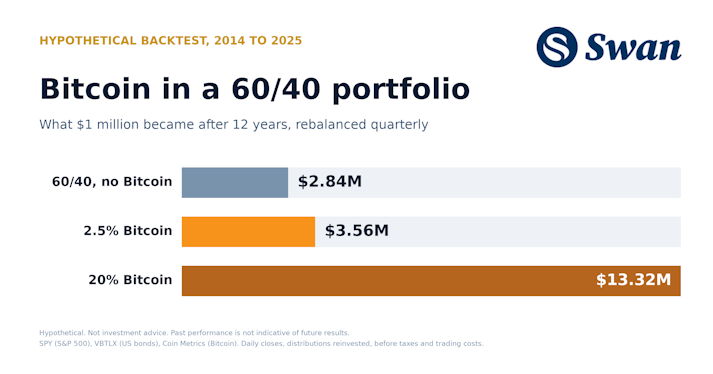
How much Bitcoin to hold in a 60/40 portfolio: 2.5% lifted annual returns from 9.1% to 11.2% (2014–2025). Results from 1% to 20%, drawdowns and method.
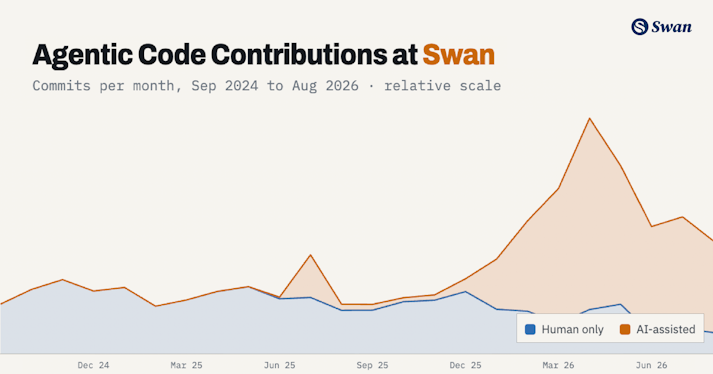
How Swan built an agentic software factory that finds production bugs, reaches consensus on the fix, opens the PR, and proves it works before a human merges.
Audio narration